Embedded Linux on Zynq: Boot Flow and Components
1. Introduction
I remember when I first started diving into Embedded Linux; my main problem was simply not knowing where to start. It can feel incredibly daunting at first. But if we follow a proper flow and hierarchy, the process can be broken down into consumable chunks. Therefore, our first step is to get a bird’s-eye view of the whole system.
2. Embedded Linux System
Every Embedded Linux system is built from a handful of software components. Each one has a specific responsibility in building and running the system, and together they form a complete operating system:
- Toolchain
- Bootloaders
- Device tree
- Linux kernel
- Root filesystem
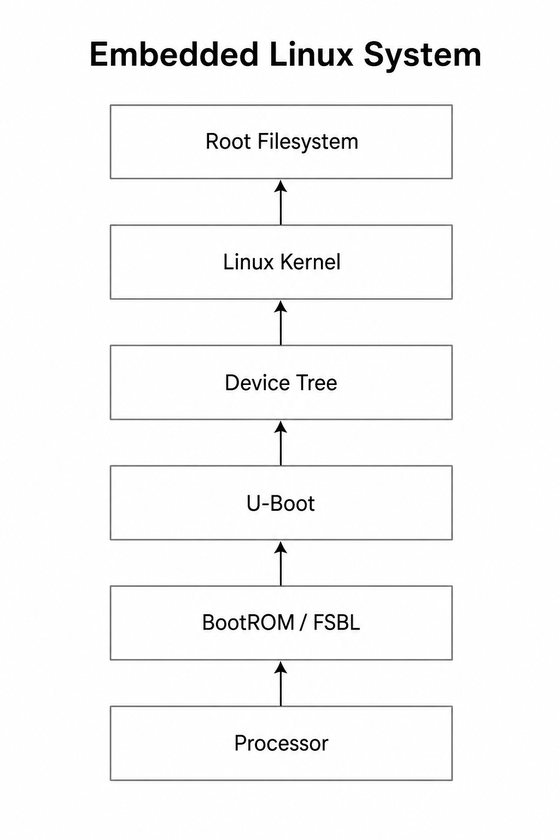
Figure 1: Major components of an Embedded Linux system.
3. Toolchain
Toolchain is exactly what it sounds like. A collection of tools — cross-compilers, build tools, and other dependencies — required to compile source code into binaries for your board.
Think of it as a compiler for your embedded processor, similar to gcc for your C program on a PC. The toolchain typically contains GCC (or Clang), the linker, assembler, debugger, standard libraries, and various build utilities for your specific processor architecture.
Why is this needed? Because the compilers that you use on your PC compile programs for your PC’s processor architecture, i.e. x86. But embedded processors can be Arm or some other architecture. If you compile the kernel using your own host compiler, it won’t run on the board. That is where we use a cross-compiler. Its purpose is to give you the build environment and compiler to build Linux on your own PC, but for the embedded processor.
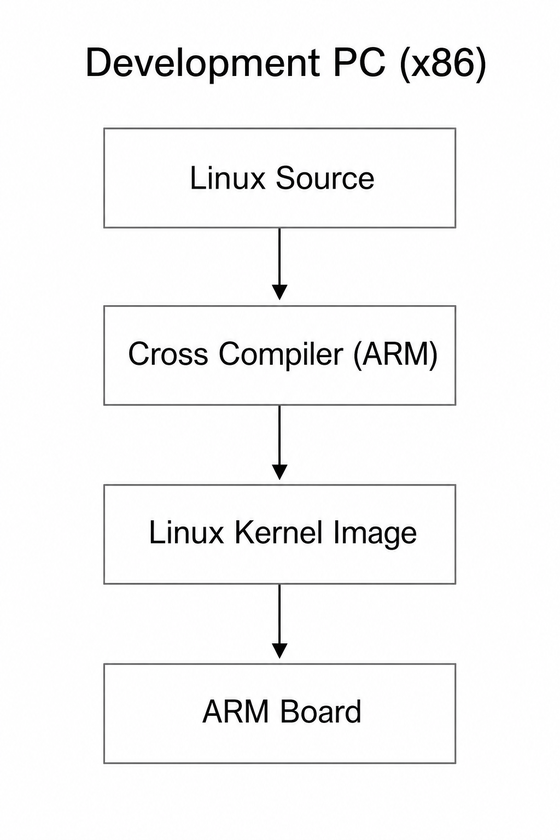
Figure 2: Cross-compilation on an x86 host for an ARM target.
4. Bootloaders
On a typical Xilinx Zynq flow you will see:
- BootROM
- FSBL
- U-Boot
The BootROM resides in the processor’s internal ROM. Before we continue, it’s important to understand that the processor and the board it is mounted on are separate. They are often designed by different manufacturers. The processor knows about its own internal hardware, but it has no information about the external peripherals connected to the board, such as the DDR memory. Because of this, the BootROM cannot initialize the DDR by itself. Because it doesn’t know which type of ddr is connected to it. What it can do is load the next stage, the First Stage Boot Loader (FSBL), into the processor’s on-chip RAM (OCRAM/SRAM).
The FSBL is the first stage you control. It is configured/built for your board’s memory and hardware, typically from from your Vivado design XSA or the board support package/BSP (the vendor package that already contains board-specific information). Once the DDR is ready, the FSBL loads U-Boot into it. On Zynq devices, the FSBL often also loads the FPGA bitstream so the PL is configured before Linux starts. You might wonder, why can’t the BootROM load U-Boot directly? The reason is that U-Boot is too large to fit in the processor’s on-chip memory. The FSBL must first initialize the DDR so that U-Boot has enough memory to run. U-Boot then prepares everything needed to boot the Linux kernel.
U-Boot performs tasks such as:
- loading the Linux kernel into RAM
- loading an initramfs (optional)
- loading the Device Tree
- passing boot arguments to the kernel
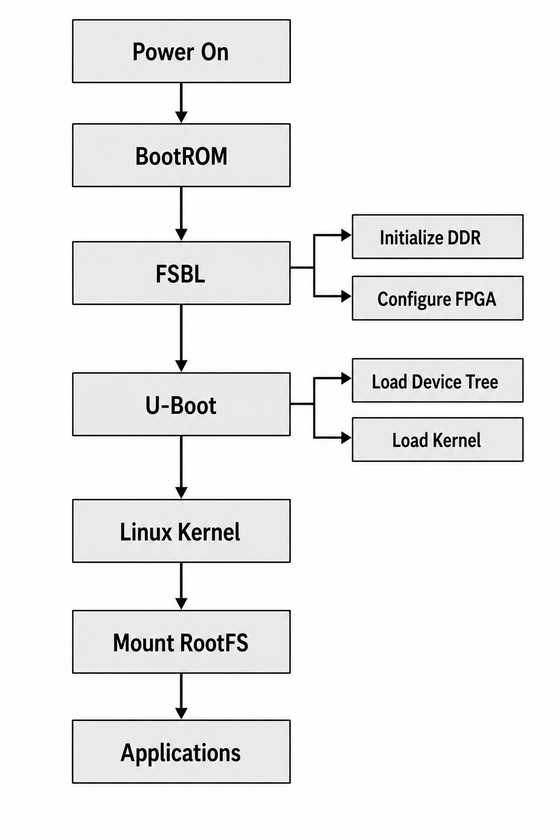
Figure 3: Boot flow from power-on to applications.
5. Kernel
The Linux kernel is the core of the operating system. It manages the CPU, memory, interrupts, scheduling, device drivers, and communication between hardware and user applications. The kernel acts as the bridge between hardware and user-space applications.
The source tree consists of all the uncompiled code. This is where a lot of Linux’s power comes from, because you have access to everything and can modify it according to your need. This source tree is usually provided by the vendor with the relevant functionality already added, and options to add more. The cross-compiler in the toolchain is then used to compile this source tree.
6. Device Tree
The kernel is compiled for a processor architecture / SoC family. It has no information by itself about every piece of hardware connected on your specific board. That board-specific detail is provided to the kernel through a separate file called the device tree.
The Linux kernel contains drivers for many peripherals supported by the SoC, but it does not know which peripherals are actually present on a specific board, how they are connected, or what hardware has been added in the FPGA fabric.
The Device Tree provides this board-specific hardware description. It describes each hardware peripheral, including its memory-mapped register addresses, interrupts, clocks, and a compatible string. During boot, the Linux kernel uses this information to match each device with the appropriate driver.
For FPGA SoCs, any AXI peripherals added in the programmable logic (PL) that need to talk to a kernel driver must also appear in the Device Tree; otherwise, the kernel will not know they exist and the driver will not be loaded for them.
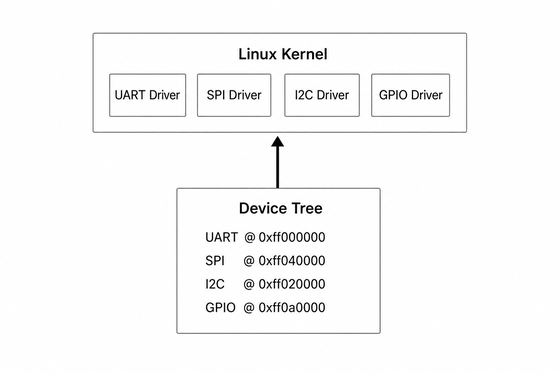
Figure 4: Device Tree describing board peripherals for kernel drivers.
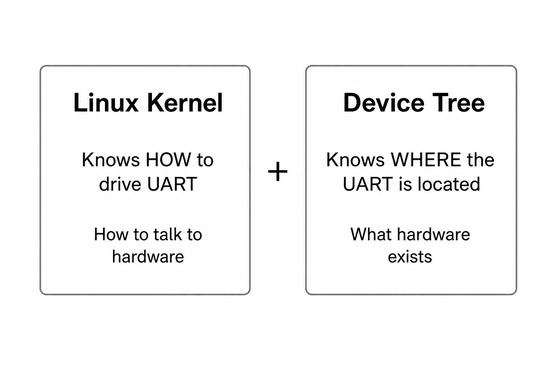
Figure 5: Kernel knows how to drive hardware; Device Tree describes what hardware exists and where it is.
7. Root Filesystem
The root filesystem contains the user-space applications, libraries, shell, configuration files, and startup scripts. After the kernel boots, it mounts the root filesystem and starts the first user-space process. This is the environment you interact with when using Linux. Utilities such as bash, ls, cp, ssh, and your own applications all live in the root filesystem.
8. Flow for FPGA
FPGA SoCs introduce one additional step during boot. Before Linux starts, the FPGA fabric must be configured with the hardware design (bitstream). The FSBL typically performs this configuration. The bitstream can also be loaded later from U-Boot or from Linux, but the common early-boot path is FSBL.
If the FPGA design contains peripherals that Linux needs to access, the Device Tree must also be updated to describe those peripherals so the appropriate kernel drivers can be loaded.
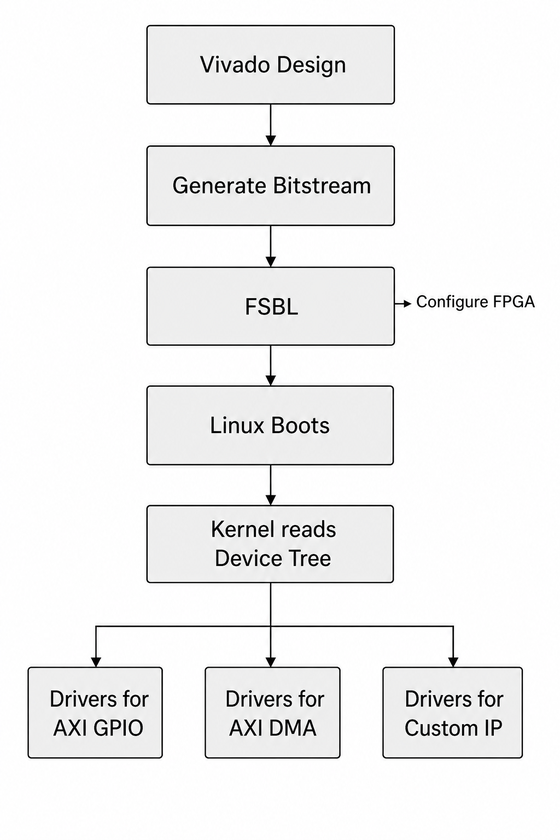
Figure 6: FPGA design path from Vivado bitstream to Linux drivers.
9. PetaLinux
PetaLinux is AMD/Xilinx’s Embedded Linux distribution built on top of the Yocto Project. It provides board support packages (BSPs), preconfigured recipes, and tools that simplify building Linux for Xilinx devices. We’ll discuss PetaLinux in more detail in upcoming blogs.
10. Summary
In this article we introduced the major building blocks of an Embedded Linux system. In the next part, we’ll begin with the toolchain and learn how to compile software for an embedded target using a cross-compiler.